
Are others having problems today with how the Boneyard displays? | The Boneyard

Are others having problems today with how the Boneyard displays?

Status
Not open for further replies.

Plebe

La verdad no peca pero incomoda
Joined
Feb 22, 2016
Messages
20,032
Reaction Score
73,696
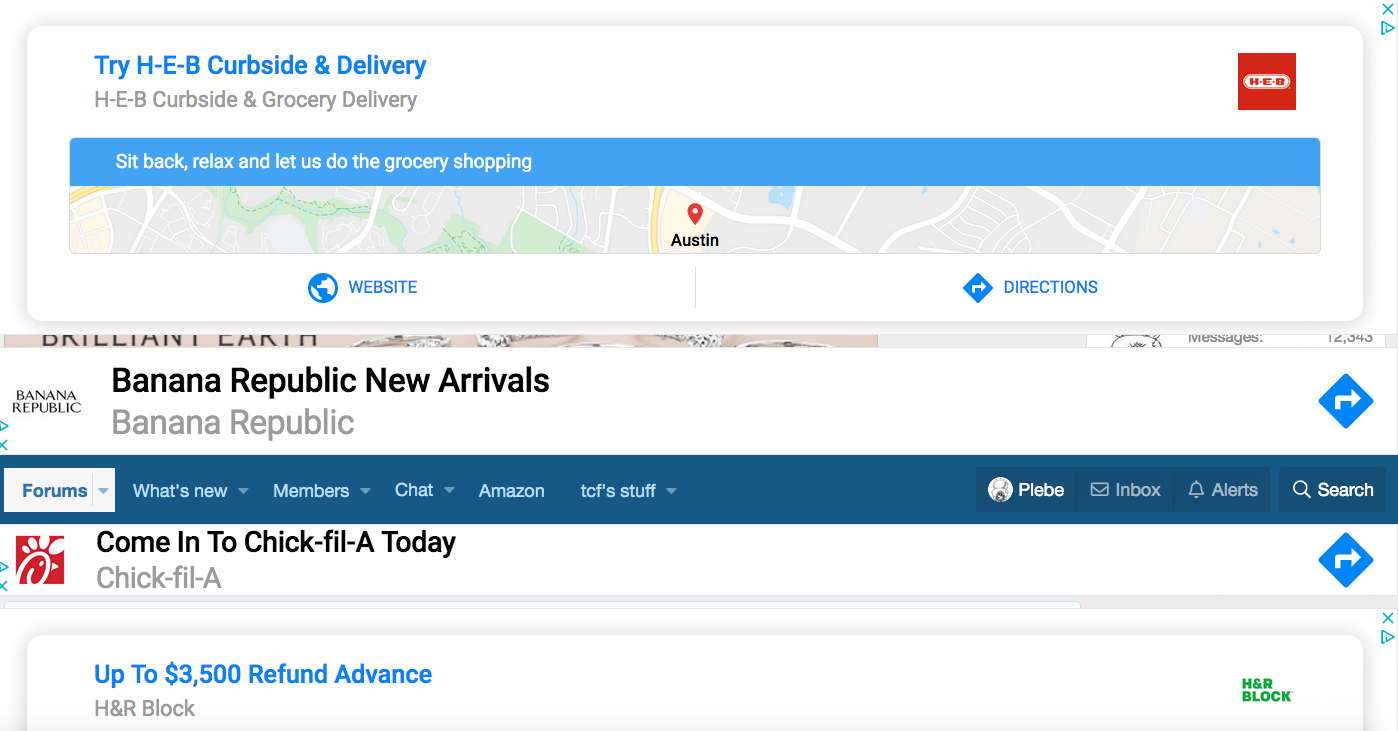
Just starting today, I've had this bizarre issue with bad screen renderings on the Boneyard, where ads take up half or all of the entire screen and I can't remove or improve it. And/or the top navigation bar drops to the middle of the page, and I can't get it to move.

I tried switching browsers from Firefox to Chrome. This seemed to work at first, but soon I started having similar problems.

Any others having similar issues? Any known fixes?

Here's an example. Ads cover the entire screen, except for the nav bar in the middle, and I'm not able to remove the ads.
1580157913008.png
 
Just starting today, I've had this bizarre issue with bad screen renderings on the Boneyard, where ads take up half or all of the entire screen and I can't remove or improve it. And/or the top navigation bar drops to the middle of the page, and I can't get it to move.

I tried switching browsers from Firefox to Chrome. This seemed to work at first, but soon I started having similar problems.

Any others having similar issues? Any known fixes?

Here's an example. Ads cover the entire screen, except for the nav bar in the middle, and I'm not able to remove the ads.

View attachment 50351
Fortunately, I have no problems today, at least with the Boneyard site.
 
I've been having the same problem on Chrome for a while, but just on my work computer (a PC). I have no issues with Chrome on my Mac. I just assumed it was a bug with my Surface.
 
I've been having this issue for a couple of days with Chrome on my mac
 
I have had this for a few weeks on all browsers and computers I tried. My only safe
venue is my smartphone.
 
.-.
I've only had it since the site was down for a system upgrade, another words just a day or two. Sometimes I just log completely out and back in and it works like it used to. But if I just close out but stay logged in it comes back.
 
I have this problem on my iPhone with Safari but not on my iPad with Safari. It’s been going on at least 10 days. If I close and clear everything, it goes away about half the time.
 
I have this problem on my iPhone with Safari but not on my iPad with Safari. It’s been going on at least 10 days. If I close and clear everything, it goes away about half the time.
Same - it's an issue approx. 50% of the time on my Brave + Android phone but so far so good on all desktop browsers.
 
Just starting today, I've had this bizarre issue with bad screen renderings on the Boneyard, where ads take up half or all of the entire screen and I can't remove or improve it. And/or the top navigation bar drops to the middle of the page, and I can't get it to move.

I tried switching browsers from Firefox to Chrome. This seemed to work at first, but soon I started having similar problems.

Any others having similar issues? Any known fixes?

Here's an example. Ads cover the entire screen, except for the nav bar in the middle, and I'm not able to remove the ads.

View attachment 50351
Yes. that exactly describes the issue I've been having for a few days. Comes and goes. Happens 1 or 2 times a day - Chrome on a Mac. Doesn't happen with mobile devices (the current Google ad behavior on iPhone is extremely annoying and intrusive on content and navigation, but that's a different issue). When it happens I can't get rid of it and have to reload the forum from the link at the bottom, or just close out and re-open the BY.
 
Last edited:
I've been intermittently dealing with this also for approx. two weeks on my laptop and android.

Reading the BY isn't nearly as enjoyable as it once was. As I've said previously, because of the size, volume, and annimations of the ads, reading the Boneyard now is like trying to read a newspaper on a roller-coaster. Head bang
 
.-.
Almost immediately after I posted the ads started to cover all of the content. Even though I clicked that I had already seen the add, or that it was covering the content, the same adds kept doing their business. Not sure now what I did to clear it up.
 
I've been having the same problem. I also use Chrome. As a matter of fact, it did it with this thread.
 
My situation is basically every time. Multiple refreshes are needed. Head bang
 
I have had an issue where the site seems to be unresponsive at times, then it catches up. I have 500 Mb/s internet so it's not that. It also does it on my phone when I'm on cellular and if I'm on at work. Strange.
 
.-.
Chrome user and having the same issue. Refresh takes care of it most of the time...but it's exceedingly frustrating.Head bang
 
I just had this problem with Chrome and fixed it (temporarily?) by clicking on the ad's X, then "report this ad," and "covered content."
 
Maybe I am too hopeful but for 24 hours, I have not had this problem. :D:D
 
Safari user here, is there any way to shut off these ads. It’s becoming unusable, I may stop visiting this site altogether
 
.-.
Status
Not open for further replies.

Forum statistics

Threads
167,619
Messages
4,530,395
Members
10,404
Latest member
RussellHall


Top Bottom