
OT: - Nerd IT Help Request | The Boneyard

OT: Nerd IT Help Request

Chin Diesel

You were just too high strung
Joined
Aug 24, 2011
Messages
35,241
Reaction Score
118,162
All the number nerds being smashed by @August_West , here is your chance to shine.

Trying to use iPad to launch some files using a web browsers- Safari, Chrome, Firefox, doesn't matter.

When we launch the files they show as a .txt type file. There is a tray of icons at the bottom and if you click the "eye" icon a preview page opens up and shows correctly.

Anyone know what it means and how it can be changed in settings so it launches correctly?
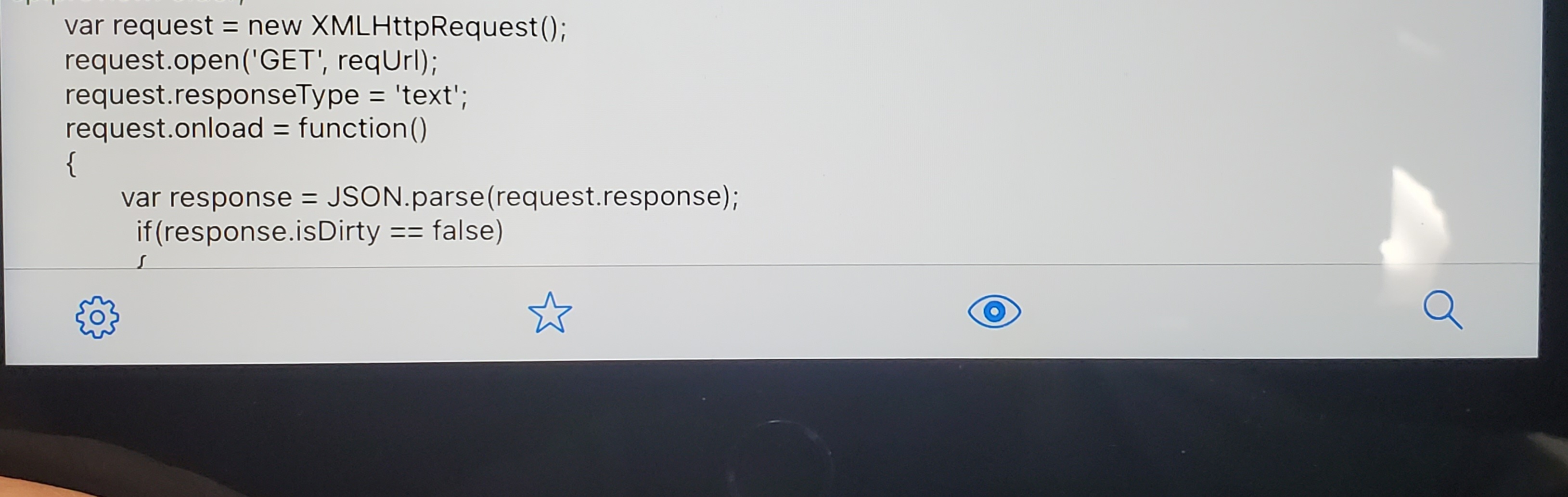
20230322_154744.jpg
 
All the number nerds being smashed by @August_West , here is your chance to shine.

Trying to use iPad to launch some files using a web browsers- Safari, Chrome, Firefox, doesn't matter.

When we launch the files they show as a .txt type file. There is a tray of icons at the bottom and if you click the "eye" icon a preview page opens up and shows correctly.

Anyone know what it means and how it can be changed in settings so it launches correctly?

View attachment 85573
1) What iOS?
2) why are you trying to launch a .txt in a browser? There are a bunch of apps for that.

Try Text viewer App. Easy. I believe if you are after iOS 10 the native "files" app will handle.
To view in files, long press and click quick look

or

Hold the file you want to open - click share and open with the app you want to open it with (like Text viewer)

iOS 15 and later its easier to permanently select default app.
 
Last edited:
1) What iOS?
2) why are you trying to launch a .txt in a browser? There are a bunch of apps for that.
It's iOS 16 something.

They're not .txt files, they are html files which should launch like that but they are displaying as the snip shows until you hit the eye icon. The eye icon pulls up a preview page and it then shows correctly. It's some interactive training stuff which allows users to run through animations and stuff.
 
The files are built using Adobe Captivate which should be able to launch using browsers.

We've been using MS Windows based machines and work grestand now we've had a bunch of iPads dumped on us.
 
The files are built using Adobe Captivate which should be able to launch using browsers.

We've been using MS Windows based machines and work grestand now we've had a bunch of iPads dumped on us.

How old are the captivate files.
 
.-.
You might be in trouble no matter what. The browser apps on iOS obviously are not as generally forgiving as their brand counterparts on PC/MacOS. Might want to dump the Ipads back and have someone dump some surface pros on you, :)

And Captivate pulled their App out of App store a couple years ago.

You can send a couple files to my email (Ill PM to you)
And I can screw around for a few this weekend, but ...........

Can someone republish these? They need to be published specifically for iOS. I assume the files you are trying were not published with that in mind. That's not hard, but you need the source files.
 
You might be in trouble no matter what. The browser apps on iOS obviously are not as generally forgiving as their brand counterparts on PC/MacOS. Might want to dump the Ipads back and have someone dump some surface pros on you, :)

And Captivate pulled their App out of App store a couple years ago.

You can send a couple files to my email (Ill PM to you)
And I can screw around for a few this weekend, but ...........

Can someone republish these? They need to be published specifically for iOS. I assume the files you are trying were not published with that in mind. That's not hard, but you need the source files.

I replied to your message.

Hopefully the mods lock this thread or move it to one of the OT boards before the , WAR, tempo and adj FG % dorks start chiming in and ruining the mojo for the team.
 
I'm showing fantastic restraint here since this isn't strictly bball related....but just know I really wanna say it...
 

Forum statistics

Threads
167,619
Messages
4,530,274
Members
10,404
Latest member
RussellHall


Top Bottom